Celebration guide
Matching Recipient Labels to Cookie Favors
Match spelling, recipient groups, and external labels so cookie favors reach the people they are intended for.
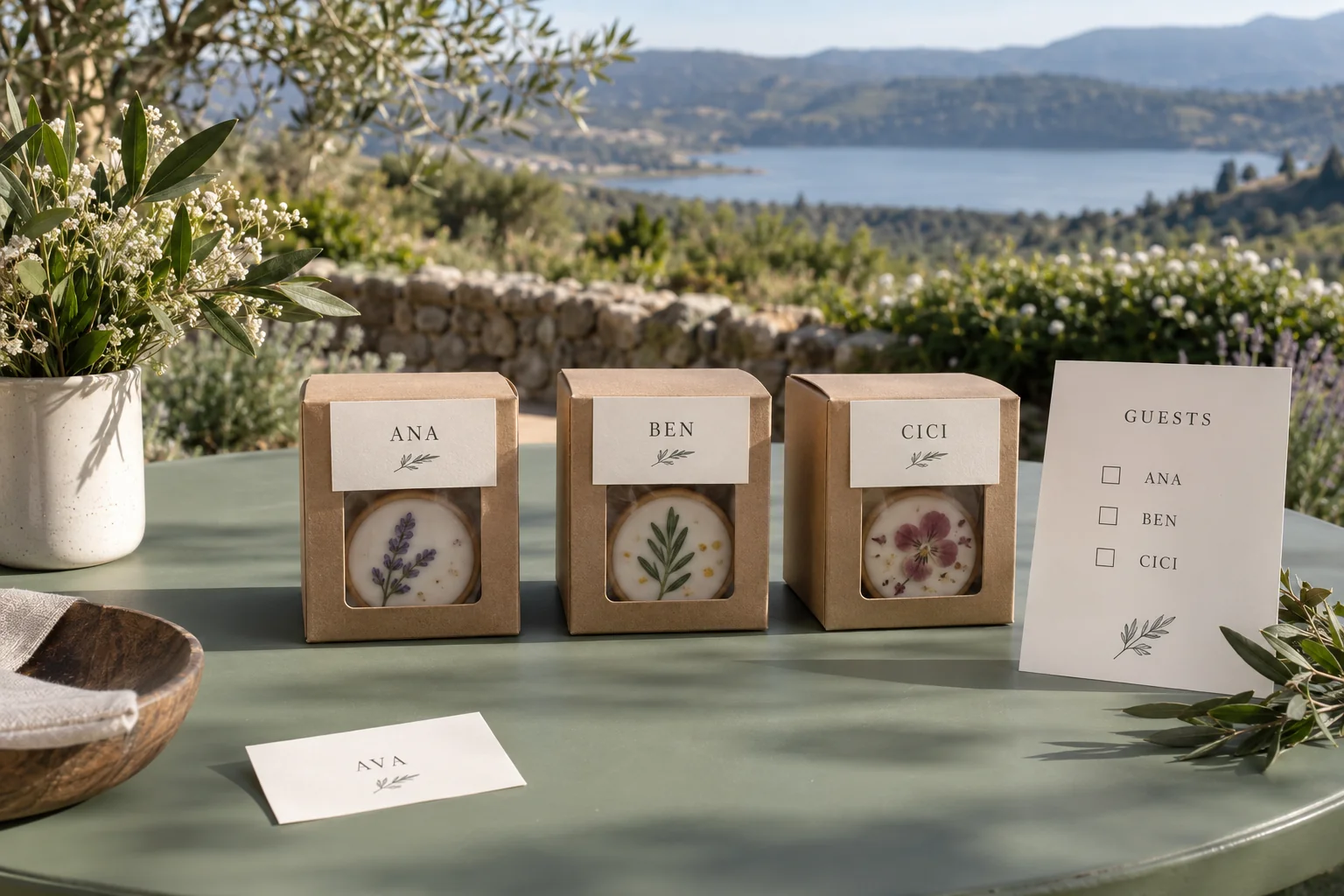
Cookie favors with name labels add a personal detail when handed out at an event. This small task can become confusing if recipient lists change, names appear in several versions, or labels are attached before packages are checked. Organised preparation connects each person to a package without opening it during distribution.
Start with one reviewed recipient list. This article concerns external labels and distribution mapping, so a label name does not automatically become text printed on a cookie. If both are required, describe them as separate requirements when discussing an order.
Define the label’s purpose
Specify whether labels show individual names, family names, groups, or event tables. This affects the amount of information and how packages are arranged. Individual names support direct handover, while group names may suit situations where recipients within a group are not yet assigned.
Also decide who will read the label. Distribution staff may need easily visible text, while guests read it closely. Do not add unnecessary personal information just because a card has space. Use the name or reference actually needed.
Separate any additional message from recipient identity. The same greeting may appear on every package, but names need individual matching. This separation is easier to check than long cards containing many variations.
Review names before making labels
Use one agreed source list. Check spelling, capitalisation, preferred names, and whether two recipients have similar names. Do not infer a nickname from a full name. Ask the event owner to determine what should appear.
Assign an internal identifier to each row if necessary. It helps link the package to the list without displaying all information on the label. For duplicate names, use an agreed distinction that respects privacy.
Record who approved the list and when that version was checked. Once labels are made, record name changes as revisions so old cards are not used accidentally. There is no need to keep several active versions on the preparation table.
Connect packages to recipients
Create a working table connecting recipient identity, label text, and package type if approved variations exist. Do not assume a name label also communicates ingredients or special requirements. Product information needs confirmation from an appropriate source.
| Record field | Purpose |
|---|---|
| Recipient reference | Connect the row to the event list |
| Label text | Record approved spelling |
| Distribution group | Help arrange packages for the event |
| Package reference | Connect to the ordered variation |
| Check status | Mark matching already completed |
Use the table to organise distribution rather than create unnecessary personal-data copies. Restrict access to people handling preparation. After the event, retain or remove the list according to the event owner’s decision.
Check packaging before attaching labels
Arrange packages and labels in small groups. Match one package to one row and mark it after the check is complete. This reduces the chance of a card slipping into another group on a busy preparation table.
Make sure the label does not cover product information that must remain readable. Choose an external placement method suitable for the packaging material and instructions. Do not open the product or change its handling just to attach a name card.
For multiple groups, provide a separate place for unchecked labels. Cards needing revision should not mix with ready cards. Internal markers can help without adding operational text to the package received by a guest.
Plan the distribution route
Decide who carries the list and who hands over packages. Arrangement may follow groups, tables, or activity order, depending on the event. Choose one system that the next person can understand easily.
Prepare a response when a recipient has not arrived or a name needs correction. Do not change a label based on guesses during the event. Record the question and obtain a decision from the designated owner. If spare packages exist, explain their purpose and usage boundaries to staff.
For quantity planning, read the party favor quantity guide. Quantity calculations and label mapping support each other but need separate checks so both package counts and recipient names are correct.
Prepare an easy-to-confirm brief
When discussing requirements through Sweetalicious, explain the distribution format, label needs, and product variations you want to ask about. Confirm whether the event owner prepares labels or whether they need discussion as part of the order. Do not assume a card format, printing, or attachment is included without confirmation.
Organised material helps the conversation: one approved text list, the number of groups, and an example of intended label placement. Packaging questions can also be prepared using the sweet packaging guide.
Use the same list from preparation through distribution for the final check. Match names, packages, and groups, retaining necessary change notes. A personalised label becomes more meaningful when the right person receives the package prepared for them.